
You spent hours perfecting your resume. You applied to 50+ jobs. You got nothing back.
Here's the brutal truth: your resume probably never reached a human.
In 2026, over 75% of resumes are automatically rejected by software called an Applicant Tracking System (ATS) — before a recruiter even lays eyes on them. It doesn't matter how qualified you are. If your resume isn't built for ATS, it's invisible.
The good news? Once you understand how ATS works, fixing your resume is simple.
This guide covers:
- What ATS is and exactly how it filters resumes
- A step-by-step process to write an ATS-friendly resume
- The most common mistakes that silently kill your application
- How to build a free ATS-optimized resume on freeresumebuilder.co in under 15 minutes
What Is an ATS (Applicant Tracking System)?
An ATS is software that companies use to handle large volumes of job applications. When you hit "Submit" on a job application, your resume doesn't land in a recruiter's inbox — it enters an automated pipeline that:
- Parses your resume to extract information (name, skills, experience, education)
- Scans for keywords that match the job description
- Scores and ranks your resume against every other applicant
- Only forwards the top-ranked resumes to a human recruiter
If your resume scores too low — because of poor formatting, missing keywords, or unreadable layout — it gets buried. Forever.
Stat that matters: 98% of Fortune 500 companies use ATS platforms like Workday, Greenhouse, Taleo, and Lever. Even mid-sized companies use them now. In 2026, ATS is the default, not the exception.
ATS Resume vs. Regular Resume — Key Differences
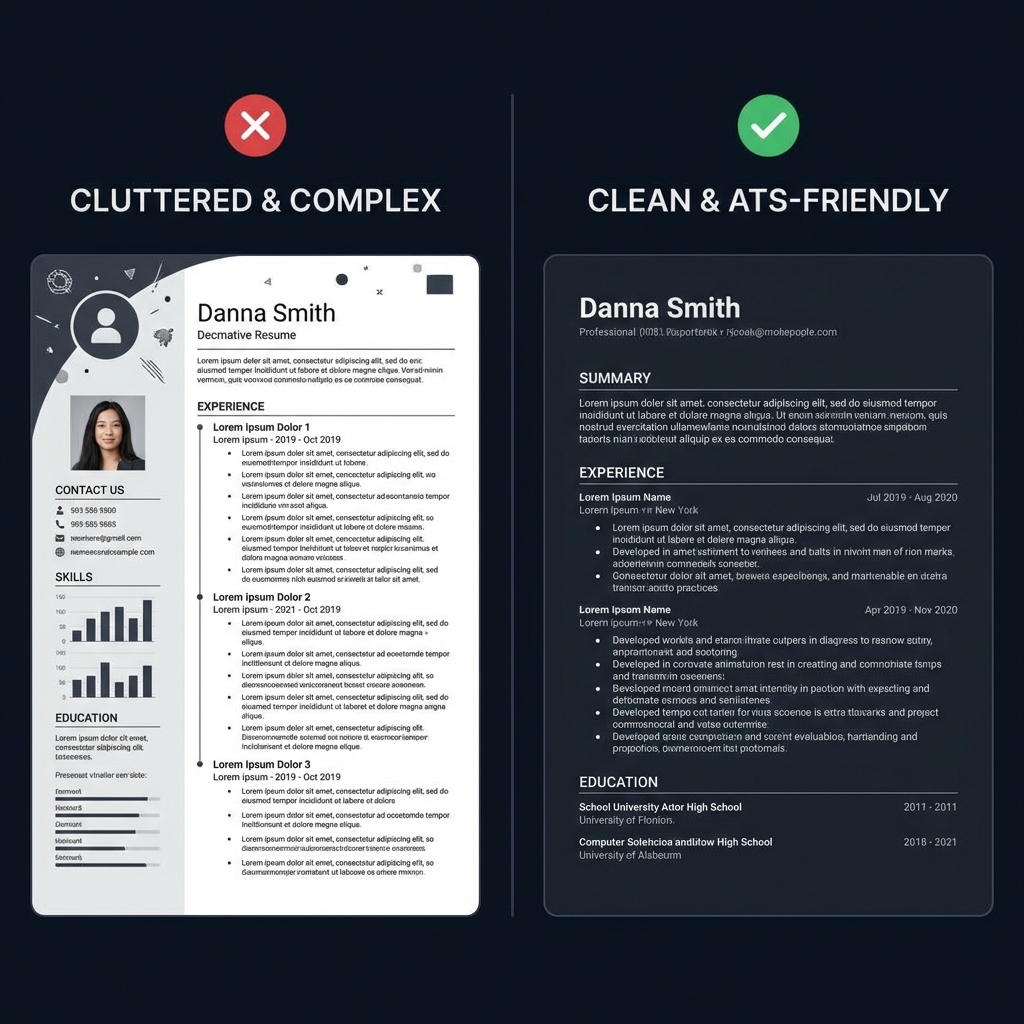
| Feature | Regular Resume | ATS Resume | | --- | --- | --- | | Design | Colorful, graphic-heavy | Clean, minimal | | Layout | Multi-column, creative | Single-column, structured | | Fonts | Decorative or unique | Standard (Arial, Calibri, Georgia) | | Keywords | Generic descriptions | Pulled from the job description | | Images / Icons | Profile photo, icons | None — ever | | File Format | Anything | Text-based PDF or .DOCX only |
A regular resume is built to impress a human eye. An ATS resume is built to be read by a machine first — and still look sharp to a recruiter second. The goal is one resume that does both.
How to Write an ATS-Friendly Resume in 2026 — Step by Step
Step 1: Use the Right File Format
ATS systems parse raw text. They cannot read images, scanned files, or visually designed PDFs exported from Canva or Photoshop.
✅ Submit as a text-based PDF or .DOCX ❌ Never submit a scanned PDF, JPEG, PNG, or image-heavy Canva export
Quick test: Open your PDF, try to select and copy the text. If you can't — it's image-based and ATS will read it as a blank page.
Every resume built on freeresumebuilder.co downloads as a clean, text-based PDF that any ATS can parse correctly.
Step 2: Use Standard Section Headings
ATS software looks for specific section labels it recognizes. Use these — don't reinvent them:
- Contact Information
- Professional Summary
- Work Experience
- Education
- Skills
- Certifications (if relevant)
- Projects (if relevant)
❌ Avoid creative headings like "My Journey," "Where I've Been," or "What I Bring to the Table." The ATS won't recognize them and may skip the section entirely.
Step 3: Mirror Keywords from the Job Description
This is the single most impactful thing you can do.
Every job posting contains specific keywords — skills, tools, job titles, qualifications. ATS systems score your resume based on how many of those exact words appear in your document.
How to do it:
- Copy the full job description into a text document
- Highlight every skill, tool, technology, and requirement mentioned
- Work those exact words naturally into your resume — in your summary, experience bullets, and skills section
Example:
Job posting says: "Proficiency in Python, SQL, and experience with data visualization tools required"
Your resume should say: "3+ years of experience in Python and SQL, with hands-on expertise in data visualization using Tableau and Power BI"
Don't stuff keywords awkwardly — write naturally, but use their language.
Step 4: Keep Formatting Simple and Clean
ATS parsers are powerful but not perfect. Complex formatting confuses them.
✅ Do this:
- Standard fonts: Calibri, Arial, Times New Roman, Georgia
- Font size: 10–12pt for body text, 14–16pt for your name/headings
- Clean bullet points (•) for experience items
- Margins between 0.5" and 1"
- Consistent date formatting (e.g., Jan 2023 – Mar 2025)
❌ Avoid this:
- Tables and text boxes (content gets scrambled)
- Multi-column layouts
- Headers and footers with key information
- Logos, icons, or profile photos
- Colored backgrounds or shading
- Fancy fonts or emojis
Step 5: Write a Keyword-Rich Professional Summary
Your professional summary sits at the top of your resume — ATS reads it first, and so does the recruiter. Make it count.
Pack it with your job title, years of experience, top skills, and a result or two. Keep it 3–4 sentences.
Example (for a Digital Marketing Manager):
"Results-driven Digital Marketing Manager with 6+ years of experience in SEO, paid media, and content strategy. Proven track record of scaling organic traffic by 120% and reducing customer acquisition costs by 35% through data-led campaigns. Skilled in Google Analytics, HubSpot, Semrush, and cross-functional team leadership."
Step 6: Write Bullet Points That Show Impact
Don't just list responsibilities. Show what you actually achieved — with numbers.
❌ "Responsible for managing the company's social media accounts"
✅ "Grew Instagram following from 8K to 47K in 12 months, driving a 28% increase in website traffic from social channels"
Formula that works:
[Action verb] + [what you did] + [result/impact with numbers]
Strong action verbs: Led, Built, Grew, Reduced, Launched, Optimized, Managed, Delivered, Increased, Streamlined
Step 7: Build a Strong Skills Section
Your skills section is one of the highest-value areas for ATS keyword matching. List them clearly — don't bury them in paragraphs.
Separate them into categories if it helps:
Technical Skills: Python, Salesforce, AutoCAD, Figma, Excel, Tableau
Soft Skills: Cross-functional collaboration, stakeholder management, strategic planning (yes, include these — many ATS scan for them)
Certifications: AWS Certified Solutions Architect, Google Analytics 4, PMP, CFA Level 1
7 Mistakes That Get Your Resume Rejected by ATS
- Using a photo — ATS can't process images; it corrupts your parsed data
- Multi-column layouts — Content gets scrambled during parsing
- Tables and text boxes — Same problem; ATS reads them out of order or skips them
- Missing keywords — Not mirroring the language from the job description
- Creative section headings — ATS won't recognize "Core Competencies Arsenal" as a skills section
- Wrong file format — Canva-exported PDFs and image files are unreadable
- Spelling errors — A typo in a keyword means it won't match — ever
How to Check Your ATS Score Before Applying
Before you hit submit, run your resume through one of these tools:
- Jobscan — Matches your resume against a specific job description and gives a compatibility score
- Resume Worded — Detailed line-by-line feedback
- Enhancv ATS Checker — Fast, free basic check
Target an ATS match score of 70% or above for roles you're serious about.
Industry-Specific ATS Keywords (2026 Quick Reference)
Software / Engineering
Python, Java, React, Node.js, REST APIs, AWS, Docker, Kubernetes, Agile, CI/CD, Git, TypeScript
Data / Analytics
SQL, Python, Tableau, Power BI, Machine Learning, ETL, Data Modeling, Spark, Pandas, A/B Testing
Digital Marketing
SEO, SEM, Google Ads, Meta Ads, Content Strategy, HubSpot, Semrush, Email Marketing, CRO, GA4
Finance / Accounting
Financial Modeling, Excel, QuickBooks, GAAP, Budgeting, Forecasting, Variance Analysis, ERP, Audit
HR / People Operations
Talent Acquisition, HRIS, Workday, Performance Management, Employee Engagement, Onboarding, Payroll
Sales / Business Development
CRM, Salesforce, Pipeline Management, B2B Sales, Lead Generation, Account Management, Revenue Growth
Build Your Free ATS Resume on freeresumebuilder.co
You don't need to spend hours formatting in Word or pay for an expensive resume service.
freeresumebuilder.co gives you everything you need — completely free:
✅ ATS-optimized templates — Clean, single-column layouts that pass every major ATS ✅ Simple editor — Fill in your details, we handle the formatting ✅ Instant PDF download — Text-based, ATS-compatible every time ✅ No account required — Start building immediately, no sign-up friction ✅ 100% free — No hidden charges, no premium paywall
👉 Build your ATS resume now: freeresumebuilder.co
Frequently Asked Questions
What does ATS-friendly mean on a resume?
An ATS-friendly resume uses simple formatting, standard section headings, and job-specific keywords so that Applicant Tracking Systems can correctly parse and score your resume — giving it a higher chance of reaching a human recruiter.
What is the best format for an ATS resume in 2026?
A text-based PDF or .DOCX file with a single-column layout, standard fonts, and no images, tables, or graphics. Avoid Canva-exported PDFs — many are image-based and unreadable by ATS.
How long should an ATS resume be?
- Freshers / 0–2 years experience: 1 page
- Mid-level / 2–8 years: 1–2 pages
- Senior professionals: 2 pages maximum
Should I include a photo on my resume?
No. Photos confuse ATS parsers and can also introduce unconscious bias in the hiring process. Leave it out unless the employer explicitly requests one.
Can I use the same resume for every job?
You can use one base resume, but tailor the keywords and summary for each role you apply to. Even small adjustments to match the job description significantly improve your ATS score.
How long does it take to build an ATS resume on freeresumebuilder.co?
Most users complete their resume in 15–20 minutes. Templates are pre-formatted for ATS compatibility, so you just fill in your content.
Final Thoughts
In 2026, getting past the ATS is the first battle in any job search. It doesn't require a professional resume writer or an expensive subscription — it just requires knowing the rules.
To recap:
- Use a text-based PDF or .DOCX file
- Mirror keywords directly from the job description
- Keep formatting simple — no tables, no columns, no images
- Use standard section headings
- Quantify your achievements wherever possible
- Check your ATS score before submitting
And the fastest way to put all of this into practice? Head to freeresumebuilder.co — free, no sign-up needed, ATS-ready in minutes.
Found this guide helpful? Share it with someone who's job hunting — it might be the thing that finally gets them an interview.
Tags: ATS resume 2026, ATS-friendly resume, how to beat ATS, applicant tracking system resume tips, free resume builder, resume keywords, resume format 2026, how to write a resume
Published by: freeresumebuilder.co Last Updated: May 2026